Quiz · Medium
Identify PC parts in a diagram and answer questions on RAM, storage, RAID, ports, printers and the troubleshooting method.
What is the first thing to do before making changes to a user's computer?
Reinstall the OS
Back up the user's data
Disable antivirus
Change the BIOS password
Back up first so you can recover if something goes wrong; it is part of identifying the problem.
In the exploded PC diagram, which numbered part converts mains AC power to DC for the components?
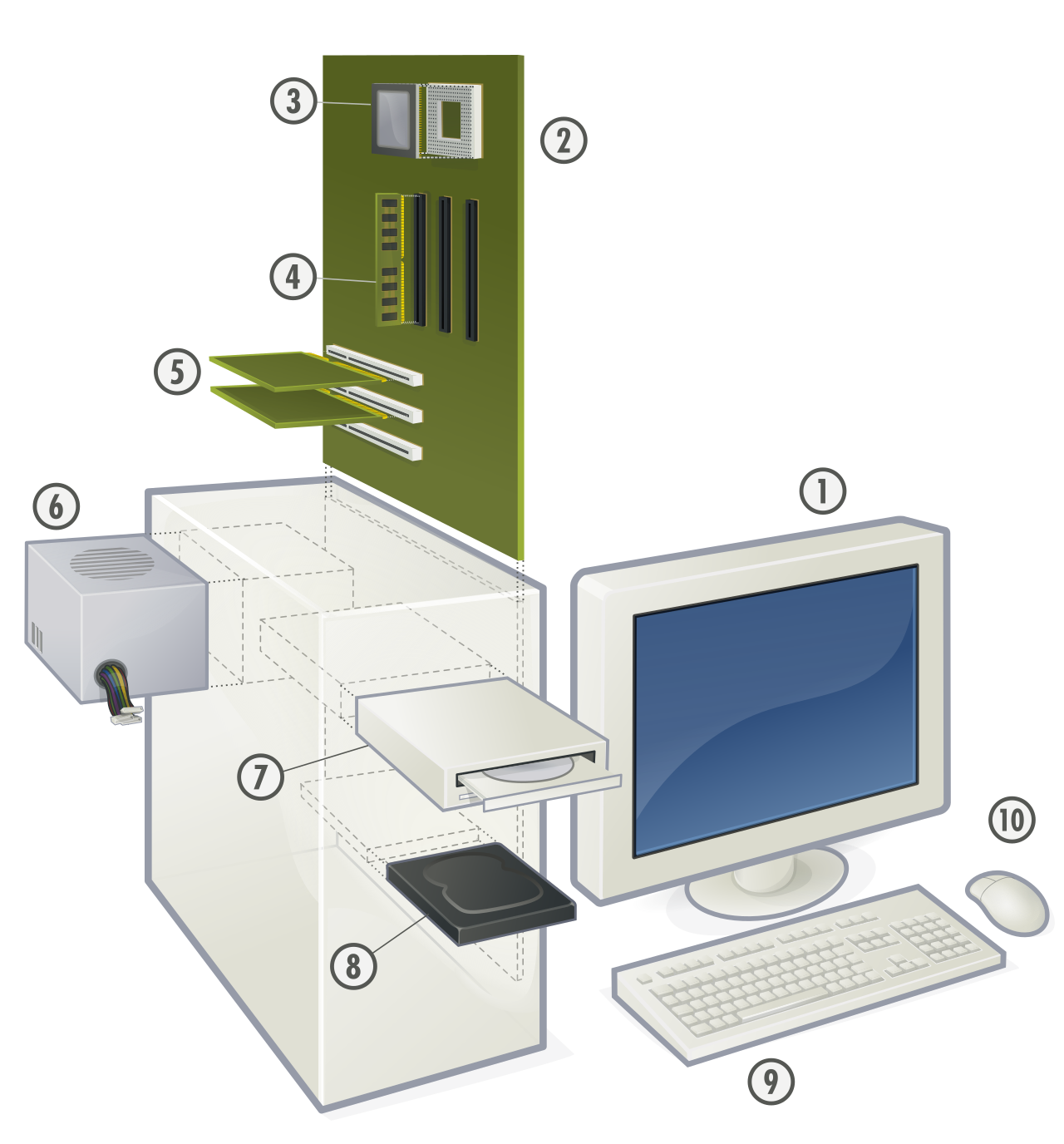
Part 2, the motherboard
Part 6, the power supply unit
Part 8, the hard drive
Part 4, the RAM
The PSU supplies +3.3, +5 and +12 V DC. Part 2 is the motherboard, 4 is RAM and 8 the hard disk drive.
Image: Gustavb, CC BY 2.5, via Wikimedia Commons.
In the diagram, which part is number 3 and is cooled by a heatsink and fan?
The CPU
The graphics card
The optical drive
The power supply
The CPU sits in the motherboard socket near the top of the board.
Image: Gustavb, CC BY 2.5, via Wikimedia Commons.
A customer wants to move a 5 GB video from a PC to an older USB flash drive formatted FAT32. What will happen?
It will succeed slowly
It will be compressed automatically
The copy fails because FAT32 has a 4 GB file size limit
The drive will be reformatted to NTFS
FAT32 cannot store files larger than 4 GB. Reformat to exFAT or NTFS (after backing up) to fix this.
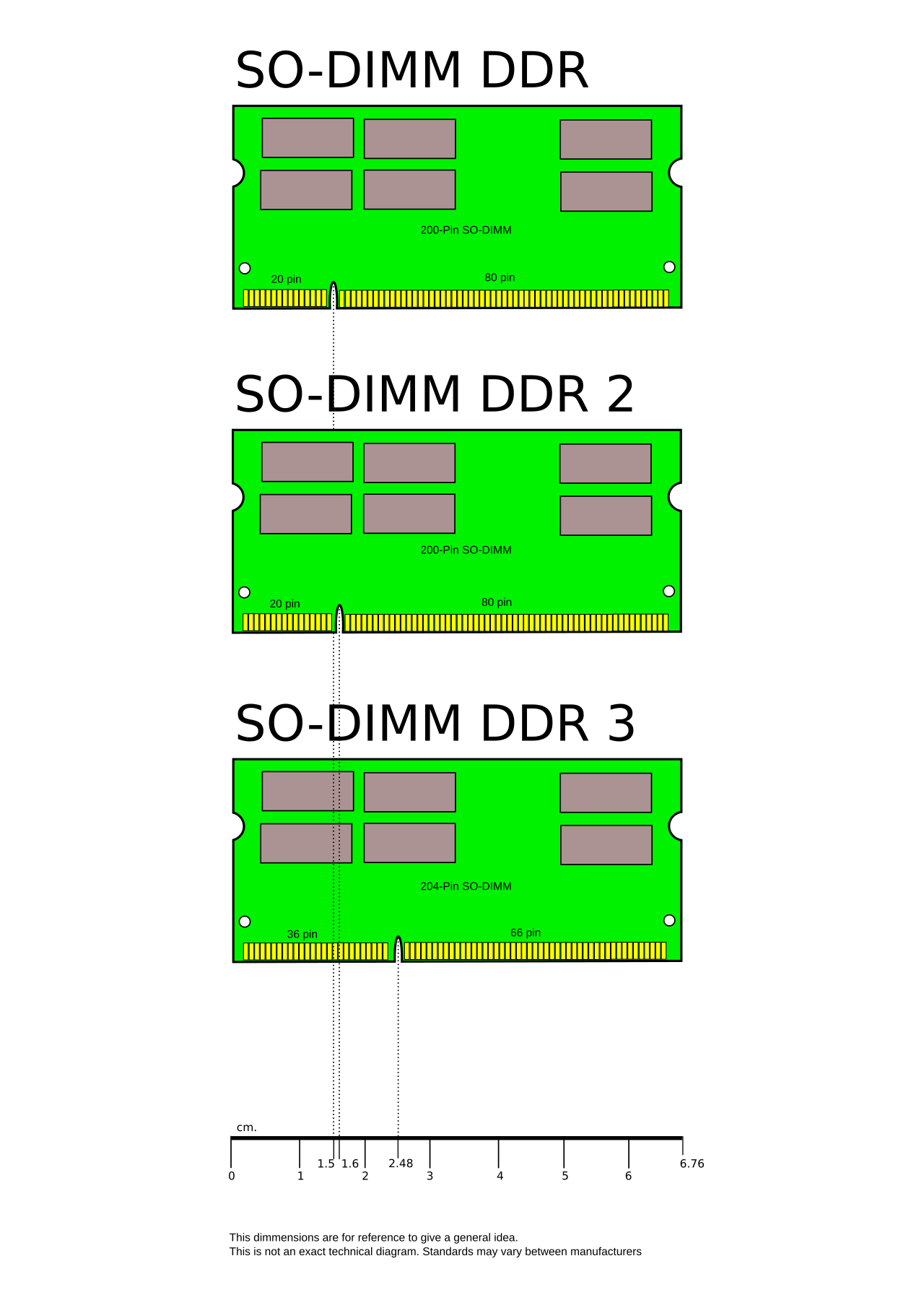
A technician sees three laptop RAM modules with different notch positions. Why are the notches in different places?
To mark the manufacturer
To allow dual-channel mode
To show the module capacity
To prevent installing the wrong memory generation in a slot
The key notch is positioned differently for DDR, DDR2 and DDR3 so incompatible modules do not fit.
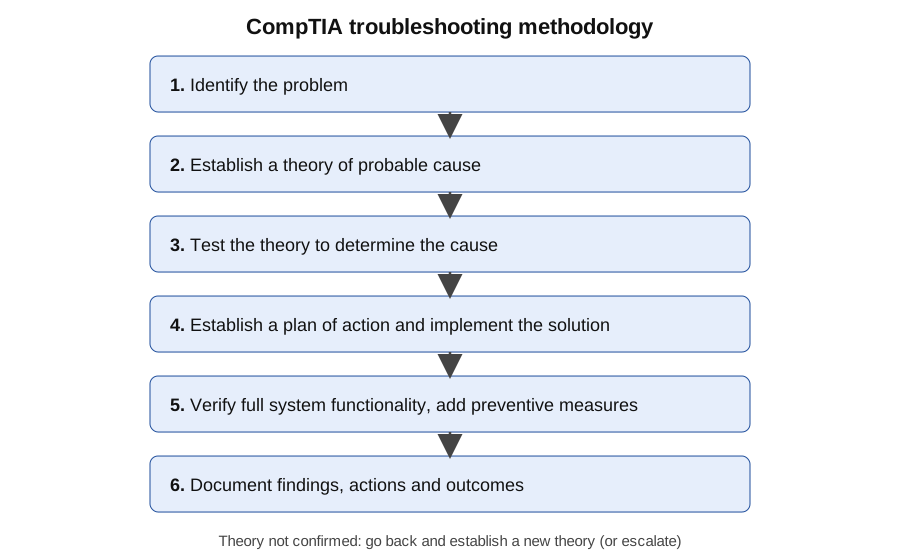
Which step comes right after 'Establish a theory of probable cause' in the CompTIA troubleshooting method shown?
Document findings
Verify full system functionality
Test the theory to determine the cause
Implement the solution
The order is: identify, theory, test, plan and implement, verify and prevent, document.
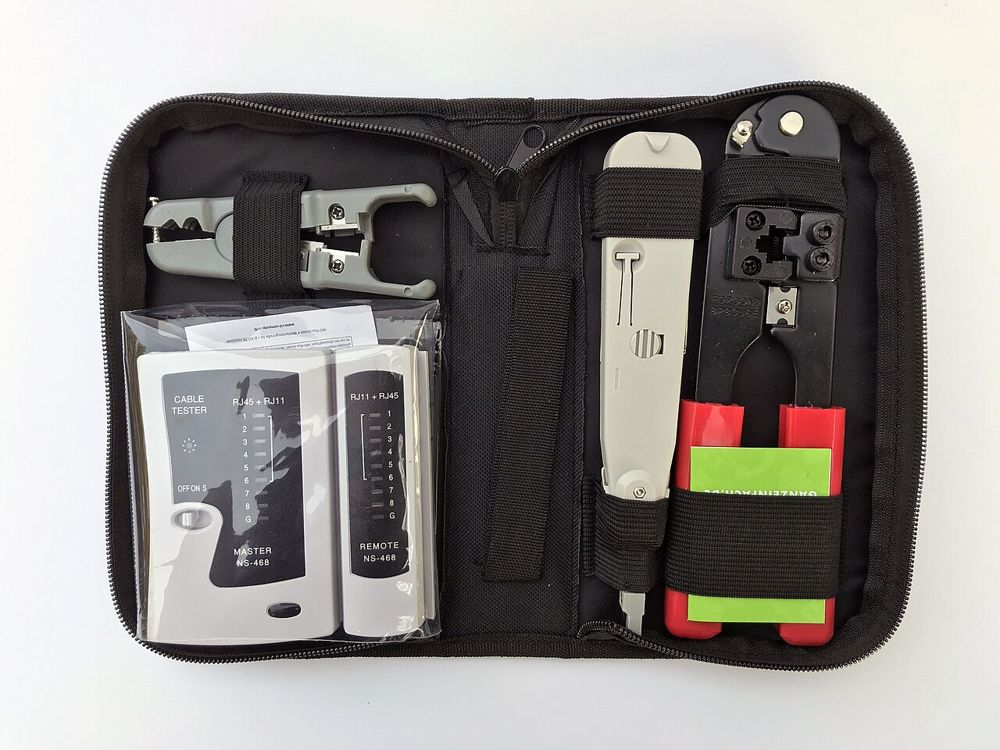
Which tool in the kit crimps an RJ45 connector onto a network cable?
The cable tester on the bottom left
The crimping tool (the black and red tool on the right)
The punch-down tool in the center
The cable stripper at the top left
The crimper presses the plug's pins into the wires. The tester checks continuity and the punch-down tool terminates wires in jacks and panels.
Image: www.heimnetzwerke.net, CC BY 4.0, via Wikimedia Commons.
A PC has an old date and time every time it is unplugged. What should you replace?
The CMOS battery (CR2032)
The power supply
The RAM
The video card
The CMOS battery keeps BIOS/UEFI settings and the clock alive when power is removed.
Which RAID level offers striping with no redundancy?
RAID 1
RAID 5
RAID 10
RAID 0
RAID 0 improves speed but one disk failure loses everything. RAID 1 mirrors and RAID 5 uses parity.
A user needs a drive array that survives two disk failures. Which RAID level fits?
RAID 0
RAID 1 with two disks
RAID 6
RAID 5
RAID 6 uses double parity. RAID 5 survives only one failure.
Which USB standard has a maximum speed of 480 Mbps?
USB 3.0
USB 2.0
USB 3.2 Gen 2
USB4
USB 2.0 High-Speed is 480 Mbps. USB 3.0 is 5 Gbps.
Which video connector carries only analog signals?
VGA
HDMI
DisplayPort
DVI-D
VGA is analog, uses a 15-pin D-sub connector and carries no audio.
Which laser printer step melts toner onto the paper?
Charging
Exposing
Developing
Fusing
The fuser uses heat and pressure to bond toner. Exposing writes the image on the drum with the laser.
Printouts from a laser printer show an identical smudge every few inches down the page. What is the most likely cause?
Low paper
Wrong printer driver
A dirty or damaged drum or roller
A bad Ethernet cable
Repeating marks match the circumference of a roller or drum.
A PC turns on, fans spin, but there is no display and a series of beeps sounds. Which component should you reseat first?
The optical drive
RAM
The keyboard
The CMOS battery
Repeating beeps with no video often indicate memory (or video) problems; check your BIOS vendor's beep code table.
Which connector supplies power to the CPU on a modern motherboard?
4/8-pin EPS
24-pin ATX only
15-pin SATA power
4-pin Molex
The 24-pin ATX connector powers the board; the separate EPS connector powers the CPU.
Which memory type detects and corrects single-bit errors?
SO-DIMM
Dual-channel RAM
Virtual memory
ECC RAM
ECC (error-correcting code) memory is used in servers and workstations.
Which type of UPS always powers the load from its inverter for the cleanest power?
Online (double-conversion) UPS
Standby UPS
Surge protector
Line-interactive UPS
An online UPS continually converts AC to DC and back to AC, isolating equipment from line problems.
Which firmware type supports GPT disks larger than 2 TB and Secure Boot?
Legacy BIOS
CMOS
POST
UEFI
UEFI supports GPT, faster boot and Secure Boot; legacy BIOS uses MBR.
A laptop's battery is swollen and pushing up the trackpad. What should you do?
Keep charging overnight to reset it
Puncture it to release the gas
Stop using it, unplug, and have it replaced and recycled safely
Freeze the battery
A swollen lithium-ion battery can catch fire. Do not charge or puncture it.
