Quiz · Medium
Predict row counts and results for INNER, LEFT, FULL and CROSS joins, NOT IN vs NOT EXISTS with NULLs, join fan-out, correlated subqueries and recursive CTEs on small tables.
customers(id, name, city)
1 Ana Lisbon | 2 Ben Berlin | 3 Cleo Lisbon | 4 Dev Paris

orders(id, customer_id, amount)
101 (1, 50) | 102 (1, 30) | 103 (2, 80)
104 (3, 20) | 105 (NULL, 15) | 106 (3, 60)
How many rows does this return?
SELECT COUNT(*) FROM customers c JOIN orders o ON o.customer_id = c.id4
5
6
7
INNER JOIN keeps only matched pairs: orders 101, 102, 103, 104 and 106. Order 105 has a NULL customer_id (NULL never matches) and Dev has no orders.
customers(id, name, city)
1 Ana Lisbon | 2 Ben Berlin | 3 Cleo Lisbon | 4 Dev Paris

orders(id, customer_id, amount)
101 (1, 50) | 102 (1, 30) | 103 (2, 80)
104 (3, 20) | 105 (NULL, 15) | 106 (3, 60)
How many rows does this return?
SELECT COUNT(*) FROM customers c LEFT JOIN orders o ON o.customer_id = c.id5
4
7
6
The 5 matched pairs plus one row for Dev (no orders), padded with NULLs. Order 105 does not appear because it is not on the left side.
customers(id, name, city)
1 Ana Lisbon | 2 Ben Berlin | 3 Cleo Lisbon | 4 Dev Paris

orders(id, customer_id, amount)
101 (1, 50) | 102 (1, 30) | 103 (2, 80)
104 (3, 20) | 105 (NULL, 15) | 106 (3, 60)
How many rows does this return?
SELECT COUNT(*) FROM customers c FULL JOIN orders o ON o.customer_id = c.id7
6
5
10
FULL JOIN = the 5 matches + unmatched left row (Dev) + unmatched right row (order 105) = 7.
customers(id, name, city)
1 Ana Lisbon | 2 Ben Berlin | 3 Cleo Lisbon | 4 Dev Paris

orders(id, customer_id, amount)
101 (1, 50) | 102 (1, 30) | 103 (2, 80)
104 (3, 20) | 105 (NULL, 15) | 106 (3, 60)
How many rows does this return?
SELECT COUNT(*) FROM customers CROSS JOIN orders10
6
24
4
A Cartesian product has 4 x 6 = 24 rows. Without a join condition every customer pairs with every order.
customers(id, name, city)
1 Ana Lisbon | 2 Ben Berlin | 3 Cleo Lisbon | 4 Dev Paris

orders(id, customer_id, amount)
101 (1, 50) | 102 (1, 30) | 103 (2, 80)
104 (3, 20) | 105 (NULL, 15) | 106 (3, 60)
What does this query return?
SELECT name FROM customers
WHERE id NOT IN (SELECT customer_id FROM orders)Dev
Dev and the owner of order 105
An error, because customer_id contains NULL
No rows
The subquery returns (1, 1, 2, 3, NULL, 3). For Dev, 4 NOT IN (..., NULL) is unknown, never true, so nothing qualifies. This is the NOT IN / NULL trap; NOT EXISTS would return Dev.
customers(id, name, city)
1 Ana Lisbon | 2 Ben Berlin | 3 Cleo Lisbon | 4 Dev Paris

orders(id, customer_id, amount)
101 (1, 50) | 102 (1, 30) | 103 (2, 80)
104 (3, 20) | 105 (NULL, 15) | 106 (3, 60)
What does this query return?
SELECT name FROM customers c
WHERE NOT EXISTS (SELECT 1 FROM orders o WHERE o.customer_id = c.id)No rows
Dev
Ana, Ben and Cleo
Dev and an extra NULL row
NOT EXISTS checks, per customer, whether any order row matches. Only Dev has none. The NULL customer_id in order 105 does not matter because the comparison is per customer, not against a list containing NULL.
customers(id, name, city)
1 Ana Lisbon | 2 Ben Berlin | 3 Cleo Lisbon | 4 Dev Paris

orders(id, customer_id, amount)
101 (1, 50) | 102 (1, 30) | 103 (2, 80)
104 (3, 20) | 105 (NULL, 15) | 106 (3, 60)
How many rows does this return?
SELECT c.name, o.amount FROM customers c
LEFT JOIN orders o ON o.customer_id = c.id
WHERE o.amount > 40
3
4
6
5
The WHERE filter removes rows where amount is NULL or 40 or below, including Dev's NULL-padded row, so the LEFT JOIN effectively becomes an INNER JOIN. Moving the condition into the ON clause would keep Dev and return 4 rows.
customers(id, name, city)
1 Ana Lisbon | 2 Ben Berlin | 3 Cleo Lisbon | 4 Dev Paris

orders(id, customer_id, amount)
101 (1, 50) | 102 (1, 30) | 103 (2, 80)
104 (3, 20) | 105 (NULL, 15) | 106 (3, 60)
items(order_id, sku, qty)
101 pen 2 | 101 ink 1 | 102 pen 5 | 103 pad 1 | 104 ink 4The true total of orders.amount is 255. What does this query return?
SELECT SUM(o.amount) FROM orders o
LEFT JOIN items i ON i.order_id = o.id255
230
305
510
Order 101 has two item rows, so its amount (50) is counted twice: 255 + 50 = 305. This is a join fan-out. Aggregate items per order first, or avoid joining items for this total.
customers(id, name, city)
1 Ana Lisbon | 2 Ben Berlin | 3 Cleo Lisbon | 4 Dev Paris

orders(id, customer_id, amount)
101 (1, 50) | 102 (1, 30) | 103 (2, 80)
104 (3, 20) | 105 (NULL, 15) | 106 (3, 60)
What count does Dev get from this query?
SELECT c.name, COUNT(*) FROM customers c
LEFT JOIN orders o ON o.customer_id = c.id
GROUP BY c.name0
1
NULL
Dev is not returned
The LEFT JOIN yields one NULL-padded row for Dev, and COUNT(*) counts rows. COUNT(o.id) would skip the NULL and return 0.
customers(id, name, city)
1 Ana Lisbon | 2 Ben Berlin | 3 Cleo Lisbon | 4 Dev Paris

orders(id, customer_id, amount)
101 (1, 50) | 102 (1, 30) | 103 (2, 80)
104 (3, 20) | 105 (NULL, 15) | 106 (3, 60)
How many rows does this return? What would UNION ALL return?
SELECT city FROM customers
UNION
SELECT city FROM customers8 rows (UNION ALL would return 3)
4 rows (UNION ALL would return 8)
3 rows (UNION ALL would return 4)
3 rows (UNION ALL would return 8)
UNION removes duplicates: Berlin, Lisbon, Paris. UNION ALL keeps all 4 + 4 = 8 rows and is cheaper because it skips the de-duplication.
emp(id, name, manager_id, dept, salary)
1 Rhea NULL Eng 150 | 2 Sam 1 Eng 120 | 3 Tia 1 Eng 120
4 Uma 2 Eng 100 | 5 Vik 3 Ops 90 | 6 Wes 1 Ops 95
What does this correlated subquery return?
SELECT name FROM emp e
WHERE salary > (SELECT AVG(salary) FROM emp WHERE dept = e.dept)
Rhea and Wes
Rhea, Sam and Tia
Only Rhea
Wes only
Eng average = 122.5, so only Rhea (150) beats it. Ops average = 92.5, so Wes (95) beats it. Comparing to the company-wide average (112.5) would instead give Rhea, Sam and Tia.
emp(id, name, manager_id, dept, salary)
1 Rhea NULL Eng 150 | 2 Sam 1 Eng 120 | 3 Tia 1 Eng 120
4 Uma 2 Eng 100 | 5 Vik 3 Ops 90 | 6 Wes 1 Ops 95
What does this query return?
WITH RECURSIVE chain(id, depth) AS (
  SELECT id, 0 FROM emp WHERE manager_id IS NULL
  UNION ALL
  SELECT e.id, c.depth + 1 FROM emp e JOIN chain c ON e.manager_id = c.id
)
SELECT MAX(depth) FROM chain1
3
2
6
Rhea is depth 0. Sam, Tia and Wes report to her (depth 1). Uma (under Sam) and Vik (under Tia) are depth 2. The recursion stops when no employees remain to add.
emp(id, name, manager_id, dept, salary)
1 Rhea NULL Eng 150 | 2 Sam 1 Eng 120 | 3 Tia 1 Eng 120
4 Uma 2 Eng 100 | 5 Vik 3 Ops 90 | 6 Wes 1 Ops 95
What does this self join return?
SELECT m.name FROM emp e JOIN emp m ON e.manager_id = m.id
GROUP BY m.name HAVING COUNT(*) > 1Rhea and Sam
Sam and Tia
Every employee
Rhea
Rhea manages three people (Sam, Tia, Wes); Sam and Tia manage one each. HAVING keeps only managers with more than one direct report.
customers(id, name, city)
1 Ana Lisbon | 2 Ben Berlin | 3 Cleo Lisbon | 4 Dev Paris

orders(id, customer_id, amount)
101 (1, 50) | 102 (1, 30) | 103 (2, 80)
104 (3, 20) | 105 (NULL, 15) | 106 (3, 60)
What does this query return?
SELECT id FROM customers
EXCEPT
SELECT customer_id FROM orders1, 2, 3, 4
4
1, 2, 3
No rows
EXCEPT returns ids that appear in the first result but not the second. The second result is {1, 2, 3, NULL}; set operators compare values directly, so unlike NOT IN, the NULL does not break it. Only 4 remains.
customers(id, name, city)
1 Ana Lisbon | 2 Ben Berlin | 3 Cleo Lisbon | 4 Dev Paris

orders(id, customer_id, amount)
101 (1, 50) | 102 (1, 30) | 103 (2, 80)
104 (3, 20) | 105 (NULL, 15) | 106 (3, 60)
You want every customer who has placed at least one order, listed exactly once. Which query does that?
SELECT name FROM customers c WHERE EXISTS (SELECT 1 FROM orders o WHERE o.customer_id = c.id)
SELECT c.name FROM customers c JOIN orders o ON o.customer_id = c.id
SELECT name FROM customers WHERE id NOT IN (SELECT customer_id FROM orders)
SELECT c.name FROM customers c LEFT JOIN orders o ON o.customer_id = c.id
EXISTS is a semi-join: one row per qualifying customer. The plain JOIN returns Ana and Cleo twice. The NOT IN query finds customers without orders (and breaks on NULLs). The LEFT JOIN also returns Dev and duplicates.
customers(id, name, city)
1 Ana Lisbon | 2 Ben Berlin | 3 Cleo Lisbon | 4 Dev Paris

orders(id, customer_id, amount)
101 (1, 50) | 102 (1, 30) | 103 (2, 80)
104 (3, 20) | 105 (NULL, 15) | 106 (3, 60)
For an INNER JOIN, does moving a condition on the right table from ON to WHERE change the result?
Yes, it always adds NULL-padded rows
Yes, WHERE runs before the join so it filters earlier
No, for an INNER JOIN the two placements are equivalent
No, because WHERE conditions are ignored in joins
For inner joins ON and WHERE filters are interchangeable. For OUTER joins they differ: a WHERE filter on the optional side removes the NULL-padded rows.
Which diagram shows a LEFT JOIN of A with B?
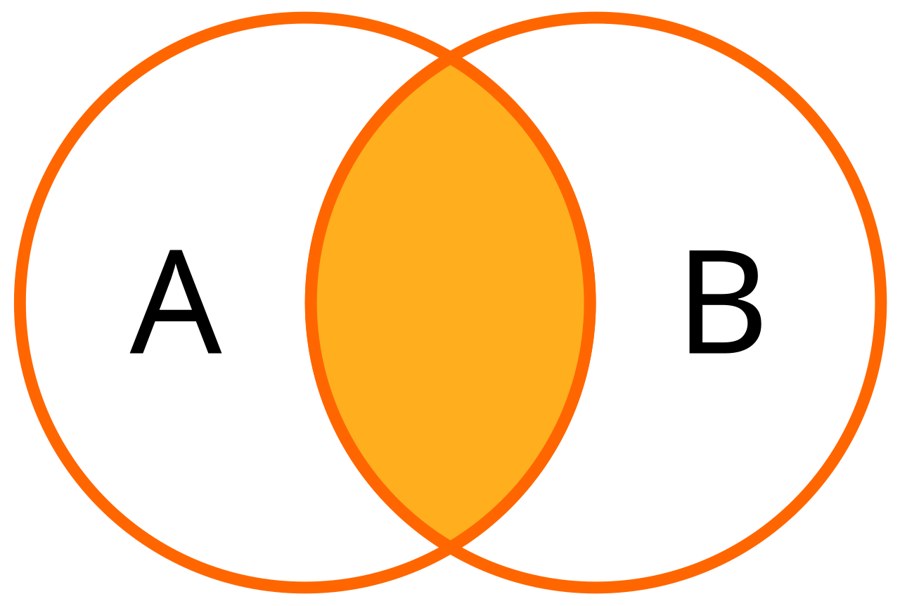
A
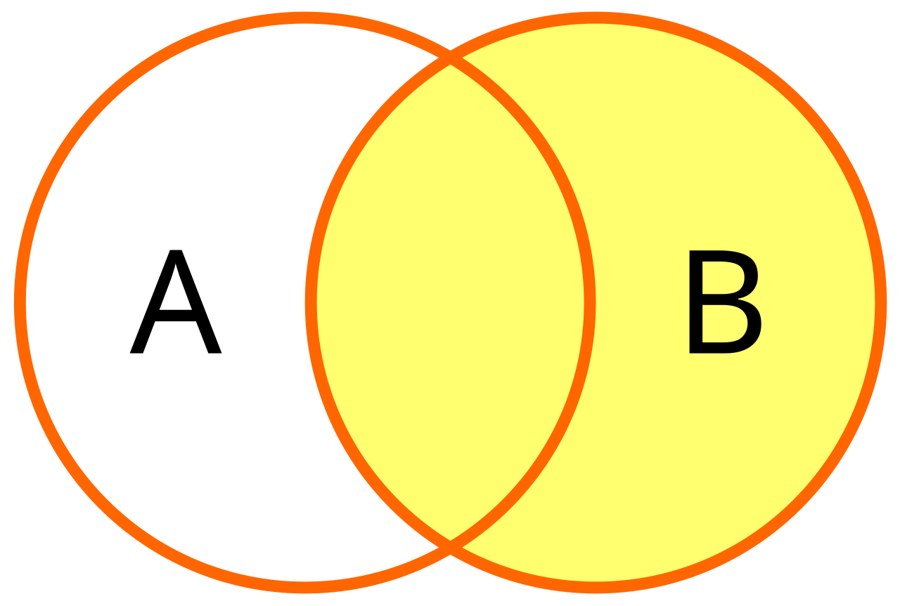
B
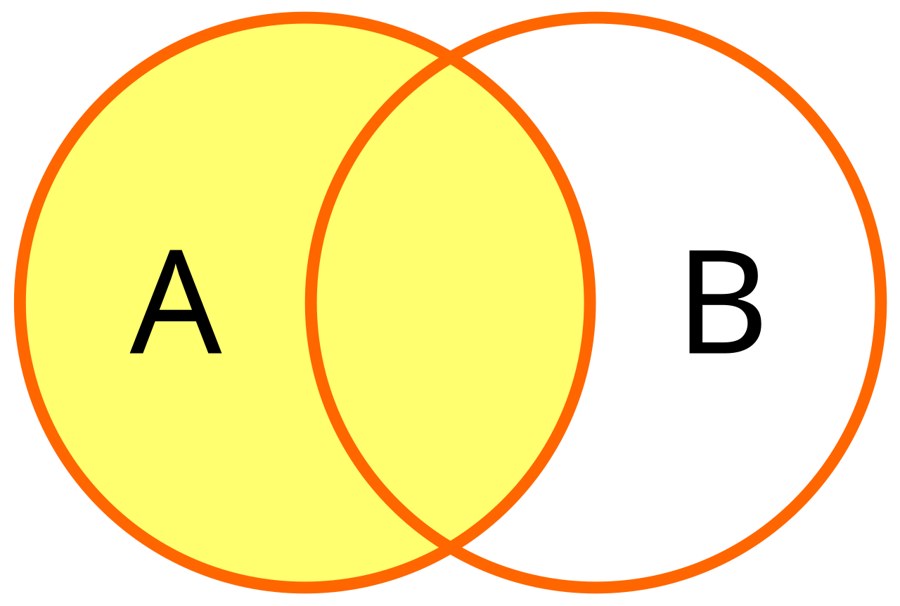
C
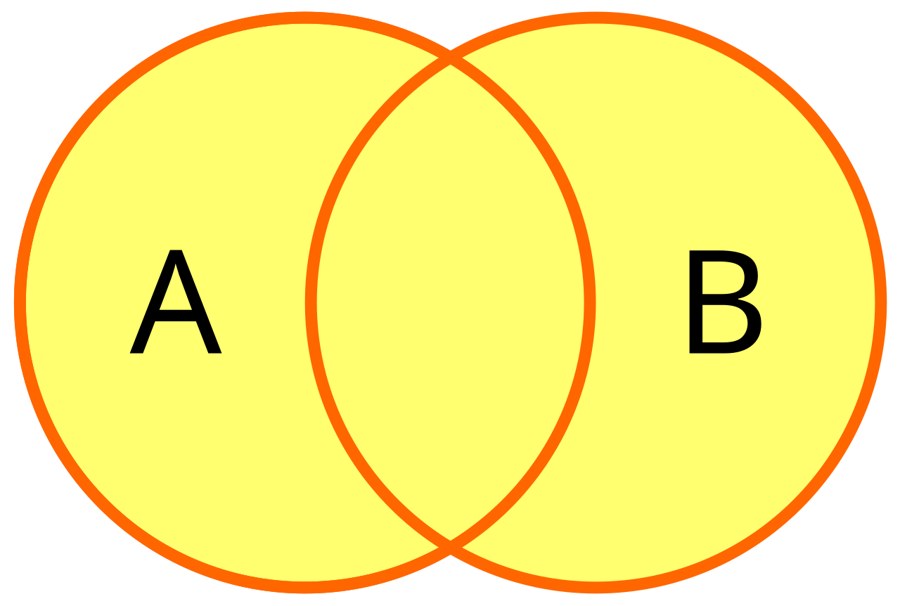
D
The LEFT JOIN keeps all of A (the left circle) plus the overlap with B. A is the inner join, B the right join and D the full join. Images: GermanX, CC BY-SA 4.0, via Wikimedia Commons.
Which join does this diagram represent?
FULL OUTER JOIN
INNER JOIN
LEFT JOIN
CROSS JOIN
Both circles are shaded completely, so all rows from both tables appear, matched where possible. Image: GermanX, CC BY-SA 4.0, via Wikimedia Commons.
