Quiz · Medium
Slicing, append vs extend, sort vs sorted, Counter, sets, dict merging, unpacking, generators, shallow vs deep copy, hashing and iteration pitfalls.
What does this code print?
a = [1, 2, 3]
a.append([4, 5])
b = [1, 2, 3]
b.extend([4, 5])
print(a, b)[1, 2, 3, 4, 5] [1, 2, 3, 4, 5]
[1, 2, 3, [4, 5]] [1, 2, 3, 4, 5]
[1, 2, 3, [4, 5]] [1, 2, 3, [4, 5]]
[1, 2, 3, 4, 5] [1, 2, 3, [4, 5]]
append adds the list as a single nested element; extend adds each item of the iterable.
What does this code print?
x = [3, 1, 2]
y = x.sort()
print(y, x)[1, 2, 3] [1, 2, 3]
[1, 2, 3] [3, 1, 2]
None [3, 1, 2]
None [1, 2, 3]
list.sort() sorts in place and returns None, so y is None while x is now sorted. Use sorted(x) to get a new list.
What does this code print?
s = ["a", "b", "c", "d", "e", "f"]
print(s[-2:], s[:3], s[1:4])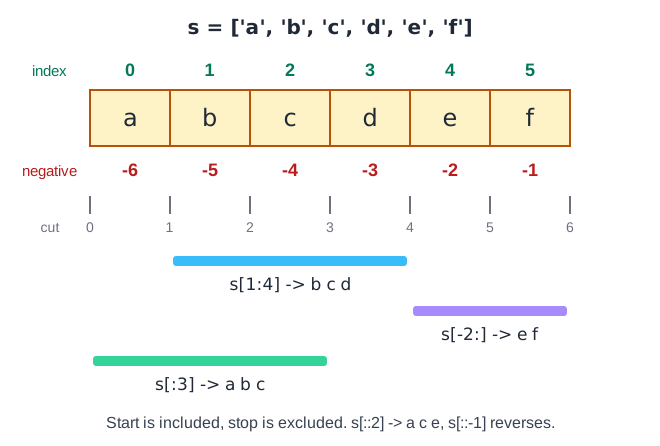
['e', 'f'] ['a', 'b', 'c'] ['b', 'c', 'd']
['e', 'f'] ['a', 'b', 'c'] ['b', 'c', 'd', 'e']
['d', 'e', 'f'] ['a', 'b', 'c'] ['b', 'c', 'd']
['e', 'f'] ['a', 'b', 'c', 'd'] ['b', 'c', 'd']
Start is included and stop is excluded. s[-2:] is the last two items, s[:3] the first three, s[1:4] items at indices 1, 2, 3.
What does this code print?
from collections import Counter
print(Counter("banana").most_common(2))[('b', 1), ('n', 2)]
[('a', 3), ('b', 1)]
[('a', 3), ('n', 2)]
[('n', 2), ('a', 3)]
Counter counts a=3, n=2, b=1; most_common(2) returns the two highest counts in descending order.
What does this code print?
print({1, 2, 3} | {3, 4}, {1, 2, 3} & {3, 4}, {1, 2, 3} - {3, 4}, {1, 2, 3} ^ {3, 4}){1, 2, 3, 4} {3} {1, 2} {3, 4}
{1, 2, 3, 4} {3} {1, 2} {1, 2, 4}
{1, 2, 3, 3, 4} {3} {1, 2} {1, 2, 4}
{1, 2, 3, 4} {3} {4} {1, 2, 4}
Union, intersection, difference (in the first set only) and symmetric difference (in exactly one set).
What does this code print?
d1 = {"a": 1}
d2 = {"b": 2, "a": 3}
print(d1 | d2)
{'a': 3, 'b': 2}
{'a': 1, 'b': 2}
{'a': 4, 'b': 2}
{'b': 2, 'a': 1}
In a dict merge, values from the right operand win for duplicate keys. The result keeps the first dict's key order: 'a' stays first.
What does this code print?
a, *rest = [1, 2, 3, 4]
print(a, rest)1 (2, 3, 4)
[1] [2, 3, 4]
1 2 3 4
1 [2, 3, 4]
Star-unpacking collects the remaining items into a list.
What does this code print?
g = (x * x for x in range(3))
print(list(g), list(g))[0, 1, 4] [0, 1, 4]
[0, 1, 4] [0, 1, 4, 9]
[0, 1, 4] []
[0, 1, 2] []
A generator is exhausted after the first list(g), so the second call returns an empty list.
What does this code print?
a = [1, 2, 3]
for x in a:
    if x == 2:
        a.remove(x)
print(a)[3]
[1, 3]
[1, 2, 3]
[1]
Removing during iteration shifts the indices. After removing 2 the loop moves on and skips what is now at that position. Here the result is [1, 3]; the lesson is never mutate a list you iterate over.
What does this code print?
x = 5
print(1 < x < 10, 1 < x < 3)True True
False False
False True
True False
Chained comparisons are evaluated as 1 < x and x < 10 and 1 < x and x < 3.
What does this code print?
print(list(zip([1, 2, 3], "ab")))[(1, 'a'), (2, 'b')]
[(1, 'a'), (2, 'b'), (3, None)]
[(1, 'a'), (2, 'b'), (3, 'a')]
[(1, 'a'), (2, 'b')] followed by a ValueError
zip stops at the shortest input, producing only two pairs. zip_longest would pad with None.
What does this code print?
from collections import defaultdict
dd = defaultdict(list)
for word in ["apple", "avocado", "banana"]:
    dd[word[0]].append(word)
print(dict(dd)){'a': 'avocado', 'b': 'banana'}
{'a': ['apple'], 'b': ['avocado', 'banana']}
{'a': ['apple', 'avocado'], 'b': ['banana']}
KeyError
defaultdict creates the missing empty list on first access, so words are grouped by first letter.
What does this code print?
import copy
a = [[1], [2]]
b = copy.deepcopy(a)
b[0].append(9)
print(a, b)[[1, 9], [2]] [[1, 9], [2]]
[[1], [2]] [[1, 9], [2]]
[[1], [2]] [[1], [2]]
[[1, 9], [2]] [[1], [2]]
deepcopy copies nested lists too, so changing b leaves a untouched. With a shallow copy both would show 9.
What does this code print?
print(sum([True, False, True]), any([]), all([]))2 False True
3 True False
2 True True
3 False True
True counts as 1, so the sum is 2. any([]) is False (no element is true) and all([]) is True (no counterexample).
What happens with d = {[1, 2]: "x"}?
It works: the key is the list [1, 2]
KeyError: [1, 2]
The list is converted to a tuple automatically
TypeError: unhashable type: 'list'
Dict keys must be hashable. Lists are mutable and therefore unhashable. A tuple such as (1, 2) works.
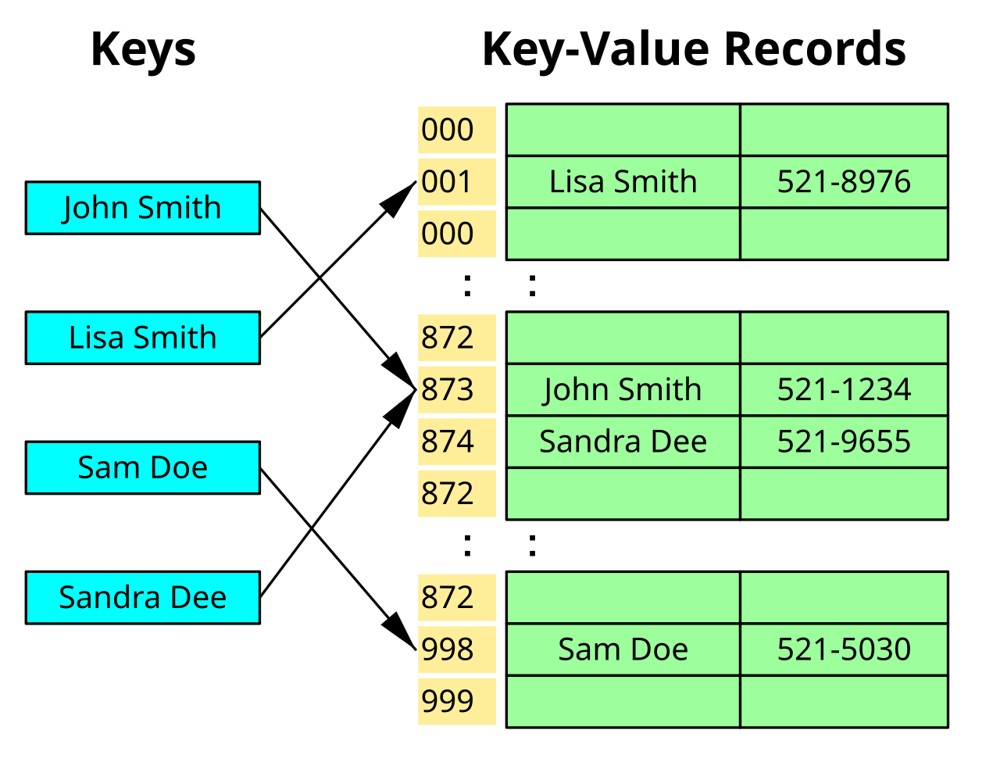
Two different keys are mapped by the hash function to the same slot of the table in the figure. What is this called, and what does it do to lookup time?
A cache miss; lookups become O(log n) always
A collision; Python raises an error
A collision; lookups stay close to O(1) on average if collisions are rare, but get slower as they pile up
A rehash; it is always O(n)
Hash tables resolve collisions (here by using the next free slot). With a good hash function and resizing, average lookups stay near constant time. Image: Jorge Stolfi, CC BY-SA 3.0, via Wikimedia Commons.
